
Custom Display Manufacturing in China: A Complete Guide to Sourcing Screens
Whether you are developing an IoT device, a medical instrument, or consumer electronics, the display is often the most critical
The MPU-6050 is not just another sensor; it’s a gateway to understanding motion in the digital world. By combining a 3-axis accelerometer and a 3-axis gyroscope on a single chip, this versatile Inertial Measurement Unit (IMU) enables projects ranging from simple orientation detection to complex motion tracking systems. While the original tutorial provides essential connection basics, this comprehensive guide dives deeper—drawing from extensive real-world implementation experience—to transform theoretical concepts into reliable, production-ready applications.
Over countless projects involving robotics, drone stabilization, and gesture control systems, I’ve identified the critical nuances that separate functional prototypes from robust implementations. The ESP32, with its dual-core processing power and ample I/O, is perfectly suited to handle the continuous data stream from the MPU-6050, especially when implementing sensor fusion algorithms that demand real-time computation. This guide will not only show you how to connect the hardware but will equip you with professional techniques for calibration, filtering, and error compensation that most tutorials overlook.
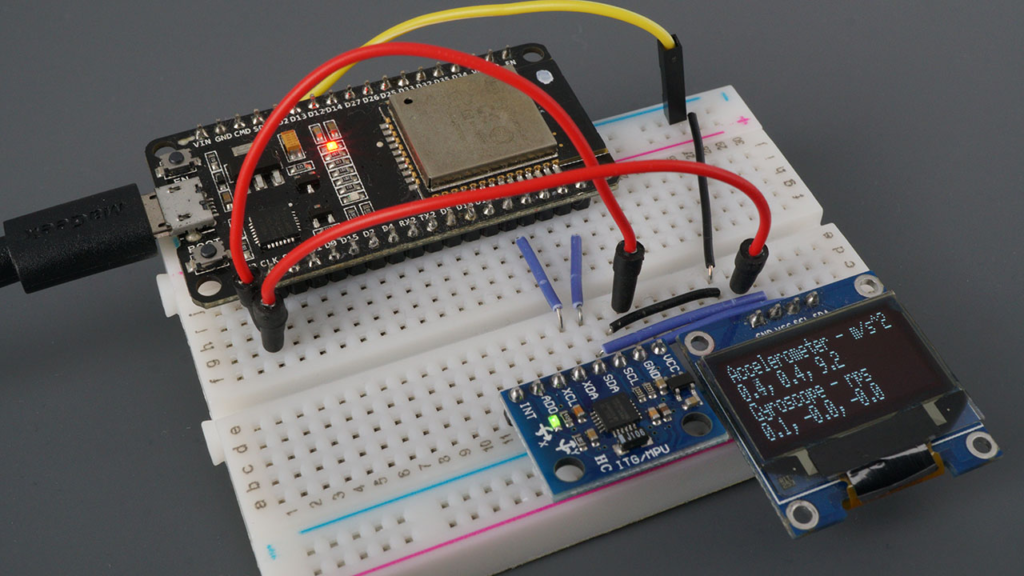
The MPU-6050’s integrated design offers significant advantages, but understanding its internal workings reveals important implementation considerations:
Accelerometer Operation:
Measurement Principle: Uses microscopic capacitive plates that move under acceleration, changing capacitance proportionally to force applied
Practical Range Selection: While the sensor supports ±2g to ±16g ranges, most projects optimally use ±4g or ±8g for general motion sensing
Noise Characteristics: Typically exhibits 400µg/√Hz noise density, requiring filtering for precise measurements
Gyroscope Characteristics:
Vibration Sensitivity: MEMS gyroscopes measure Coriolis force on vibrating structures, making them sensitive to external vibration
Temperature Dependence: Zero-rate output can drift up to 0.1°/s/°C without compensation
Startup Time: Requires 30-50ms stabilization after power-on for reliable readings
Integrated Temperature Sensor:
Primarily intended for internal compensation rather than ambient measurement
Accuracy of ±1°C suffices for sensor calibration purposes
Response time of approximately 4 seconds to temperature changes
While the basic pin connections are straightforward, several pins offer advanced functionality:
AD0 Address Pin:
// Professional I2C address management for multiple MPU-6050 units
class MPU6050_Array {
private:
    int addressPins[4] = {15, 16, 17, 18}; // GPIOs controlling AD0
    int sensorCount = 0;

public:
    void initializeArray() {
        // Configure multiple sensors on same I2C bus
        for(int i = 0; i < 4; i++) {
            pinMode(addressPins[i], OUTPUT);
            digitalWrite(addressPins[i], LOW); // Default address 0x68

            // Test each potential sensor
            Wire.beginTransmission(0x68 + i);
            if(Wire.endTransmission() == 0) {
                sensorCount++;
                Serial.printf("Found MPU-6050 at address 0x%X\n", 0x68 + i);
            }
        }
    }

    int getSensorCount() { return sensorCount; }
};
Interrupt Pin (INT) Applications:
Data Ready Interrupt: Eliminates polling and reduces processor load
Motion Detection: Configurable threshold-based wake-from-sleep triggering
Zero Motion Detection: Energy-saving feature for battery-operated devices
Auxiliary I2C Bus (XDA, XCL):
Enables daisy-chaining of additional I2C sensors
Maintains synchronized sampling between multiple sensors
Offloads data collection from main processor
While the Adafruit library offers excellent simplicity, professional applications often benefit from alternative approaches:
Library Comparison Table:
| Library | Best For | Key Features | Performance Consideration |
|---|---|---|---|
| Adafruit MPU6050 | Quick prototyping, learning | Simple API, good documentation, OLED examples | Higher-level abstraction, some latency |
| Jeff Rowberg’s MPU6050 | Advanced applications, research | Raw register access, DMP support, calibration tools | Steeper learning curve, maximum flexibility |
| PlatformIO Built-in | Cross-platform development | Integrated dependency management | Consistent across platforms |
Professional Library Setup:
// PlatformIO platformio.ini configuration for production projects
[env:esp32dev]
platform = espressif32
board = esp32dev
framework = arduino

lib_deps =
    adafruit/Adafruit MPU6050 @ ^2.1.0
    adafruit/Adafruit Unified Sensor @ ^1.1.7
    adafruit/Adafruit BusIO @ ^1.14.1
    adafruit/Adafruit SSD1306 @ ^2.5.7

monitor_speed = 115200
build_flags =
    -D MPU6050_CALIBRATION_ENABLED
    -D ENABLE_SENSOR_FUSION
While GPIO 21 (SDA) and 22 (SCL) are default I2C pins, the ESP32 offers flexibility with important considerations:
Recommended I2C Pin Alternatives:
Primary: GPIO 21 (SDA), GPIO 22 (SCL) – Default, minimal configuration
Secondary: GPIO 15 (SDA), GPIO 13 (SCL) – Avoid conflicts with flash memory
Tertiary: GPIO 18 (SDA), GPIO 19 (SCL) – Good for breadboard layouts
Professional Wiring Considerations:
// I2C bus diagnostics and optimization
void diagnoseI2CBus(int sdaPin, int sclPin) {
    Wire.begin(sdaPin, sclPin);
    Wire.setClock(400000); // Fast-mode 400kHz

    Serial.println("\n=== I2C BUS DIAGNOSTICS ===");

    // Scan for devices
    byte error, address;
    int devicesFound = 0;

    for(address = 1; address < 127; address++) {
        Wire.beginTransmission(address);
        error = Wire.endTransmission();

        if(error == 0) {
            Serial.printf("Device found at address 0x%02X\n", address);
            devicesFound++;
        }
    }

    Serial.printf("Total devices found: %d\n", devicesFound);

    // Test communication speed
    unsigned long startTime = micros();
    for(int i = 0; i < 100; i++) {
        Wire.beginTransmission(0x68); // MPU-6050 address
        Wire.write(0x3B); // ACCEL_XOUT_H register
        Wire.endTransmission(false);
        Wire.requestFrom(0x68, 14);
        while(Wire.available()) Wire.read();
    }
    unsigned long endTime = micros();

    float transferTime = (endTime - startTime) / 100.0;
    Serial.printf("Average read time: %.2f µs\n", transferTime);

    if(transferTime > 1000) {
        Serial.println("Warning: I2C communication slower than expected");
        Serial.println("Check pull-up resistors (4.7kΩ recommended)");
    }
}
The default ±8g accelerometer and ±500°/s gyroscope ranges work for general purposes, but optimal configuration depends on your specific application:
Application-Specific Configuration Guide:
| Project Type | Accelerometer Range | Gyroscope Range | Filter Bandwidth | Rationale |
|---|---|---|---|---|
| Gesture Recognition | ±4g | ±250°/s | 21-44 Hz | Maximizes resolution for subtle motions |
| Drone Flight Controller | ±8g | ±1000°/s | 94-184 Hz | Captures rapid maneuvers, reduces latency |
| Step Counter/Pedometer | ±2g | ±250°/s | 5-10 Hz | Focuses on low-frequency human motion |
| Vehicle Telemetry | ±16g | ±2000°/s | 260 Hz | Handles high-G events, minimal filtering |
| Robotic Arm Control | ±8g | ±500°/s | 21-44 Hz | Balances precision and responsiveness |
Dynamic Range Adjustment Code:
class AdaptiveMPU6050 {
private:
    Adafruit_MPU6050 mpu;
    float currentMaxAccel = 0;
    float currentMaxGyro = 0;
    unsigned long lastRangeCheck = 0;
    const unsigned long rangeCheckInterval = 1000; // Check every second

public:
    void initialize() {
        if(!mpu.begin()) {
            Serial.println("MPU6050 initialization failed!");
            while(1);
        }

        // Start with conservative ranges
        mpu.setAccelerometerRange(MPU6050_RANGE_4_G);
        mpu.setGyroRange(MPU6050_RANGE_250_DEG);
        mpu.setFilterBandwidth(MPU6050_BAND_21_HZ);
    }

    void update() {
        sensors_event_t a, g, temp;
        mpu.getEvent(&a, &g, &temp);

        // Track maximum values for adaptive configuration
        trackPeaks(a, g);

        // Periodically adjust ranges if needed
        if(millis() - lastRangeCheck > rangeCheckInterval) {
            adjustRanges();
            lastRangeCheck = millis();
        }
    }

private:
    void trackPeaks(sensors_event_t& a, sensors_event_t& g) {
        // Calculate vector magnitudes
        float accelMag = sqrt(a.acceleration.x * a.acceleration.x +
                               a.acceleration.y * a.acceleration.y +
                               a.acceleration.z * a.acceleration.z);

        float gyroMag = sqrt(g.gyro.x * g.gyro.x +
                             g.gyro.y * g.gyro.y +
                             g.gyro.z * g.gyro.z);

        // Update peaks with decay
        currentMaxAccel = max(currentMaxAccel * 0.95, accelMag);
        currentMaxGyro = max(currentMaxGyro * 0.95, gyroMag * 180/PI); // Convert to °/s
    }

    void adjustRanges() {
        // Adjust accelerometer range
        if(currentMaxAccel > 14) {
            mpu.setAccelerometerRange(MPU6050_RANGE_16_G);
            Serial.println("Accelerometer range increased to ±16g");
        } else if(currentMaxAccel > 6 && currentMaxAccel <= 14) {
            mpu.setAccelerometerRange(MPU6050_RANGE_8_G);
        } else if(currentMaxAccel <= 6) {
            mpu.setAccelerometerRange(MPU6050_RANGE_4_G);
        }

        // Adjust gyroscope range (convert to °/s for comparison)
        if(currentMaxGyro > 1500) {
            mpu.setGyroRange(MPU6050_RANGE_2000_DEG);
            Serial.println("Gyroscope range increased to ±2000°/s");
        } else if(currentMaxGyro > 750 && currentMaxGyro <= 1500) {
            mpu.setGyroRange(MPU6050_RANGE_1000_DEG);
        } else if(currentMaxGyro <= 750) {
            mpu.setGyroRange(MPU6050_RANGE_500_DEG);
        }

        // Reset tracking
        currentMaxAccel = 0;
        currentMaxGyro = 0;
    }
};
The MPU-6050’s configurable Digital Low-Pass Filter (DLPF) significantly impacts performance:
Bandwidth Selection Guidelines:
5-10 Hz: Excellent noise reduction, suitable for slow movements (<1Hz)
21-44 Hz: General purpose, balances noise and responsiveness
94-184 Hz: High dynamic applications, minimal latency
260 Hz: Maximum bandwidth, useful for impact detection
Filter Performance Analysis:
void analyzeFilterPerformance() {
    Serial.println("\n=== FILTER PERFORMANCE ANALYSIS ===");

    // Test each filter setting
    int bandwidths[] = {5, 10, 21, 44, 94, 184, 260};
    const char* bandwidthNames[] = {"5 Hz", "10 Hz", "21 Hz", "44 Hz",
                                    "94 Hz", "184 Hz", "260 Hz"};

    for(int i = 0; i < 7; i++) {
        // Configure filter
        switch(bandwidths[i]) {
            case 5: mpu.setFilterBandwidth(MPU6050_BAND_5_HZ); break;
            case 10: mpu.setFilterBandwidth(MPU6050_BAND_10_HZ); break;
            case 21: mpu.setFilterBandwidth(MPU6050_BAND_21_HZ); break;
            case 44: mpu.setFilterBandwidth(MPU6050_BAND_44_HZ); break;
            case 94: mpu.setFilterBandwidth(MPU6050_BAND_94_HZ); break;
            case 184: mpu.setFilterBandwidth(MPU6050_BAND_184_HZ); break;
            case 260: mpu.setFilterBandwidth(MPU6050_BAND_260_HZ); break;
        }

        delay(100); // Allow filter to settle

        // Collect samples for analysis
        float noiseLevel = 0;
        const int samples = 100;

        for(int j = 0; j < samples; j++) {
            sensors_event_t a, g, temp;
            mpu.getEvent(&a, &g, &temp);

            // Calculate noise (deviation from running average)
            static float avgAccelZ = 9.81;
            avgAccelZ = avgAccelZ * 0.99 + a.acceleration.z * 0.01;
            noiseLevel += abs(a.acceleration.z - avgAccelZ);

            delay(10);
        }

        noiseLevel /= samples;

        Serial.printf("%-6s: Noise ≈ %.3f m/s², Latency ≈ %.1f ms\n",
                      bandwidthNames[i], noiseLevel, 1000.0/(bandwidths[i]*2));
    }
}
The tutorial mentions calibration but doesn’t provide a complete methodology. Here’s a professional calibration routine:
class MPU6050_Calibrator {
private:
    struct CalibrationData {
        float accelBias[3] = {0, 0, 0};
        float accelScale[3] = {1, 1, 1};
        float gyroBias[3] = {0, 0, 0};
        float tempCompensation = 0;
    } calibration;

public:
    void performFullCalibration() {
        Serial.println("\n=== MPU-6050 SIX-POSITION CALIBRATION ===");
        Serial.println("Place sensor in each orientation as instructed");
        Serial.println("Each position requires 2 seconds of stable data");

        // Array of positions: +X, -X, +Y, -Y, +Z, -Z
        const char* positions[] = {"+X axis up", "-X axis up",
                                   "+Y axis up", "-Y axis up",
                                   "+Z axis up", "-Z axis up"};

        float readings[6][3]; // Store averages for each position

        for(int pos = 0; pos < 6; pos++) {
            Serial.printf("\nPosition %d/%d: %s\n", pos+1, 6, positions[pos]);
            Serial.println("Place sensor and press any key to continue...");
            while(!Serial.available());
            Serial.read(); // Clear the key

            // Wait for stabilization
            delay(1000);

            // Collect data
            float sum[3] = {0, 0, 0};
            const int samples = 200;

            for(int i = 0; i < samples; i++) {
                sensors_event_t a, g, temp;
                mpu.getEvent(&a, &g, &temp);

                sum[0] += a.acceleration.x;
                sum[1] += a.acceleration.y;
                sum[2] += a.acceleration.z;

                delay(10);
            }

            readings[pos][0] = sum[0] / samples;
            readings[pos][1] = sum[1] / samples;
            readings[pos][2] = sum[2] / samples;

            Serial.printf("  Average: X=%.3f, Y=%.3f, Z=%.3f m/s²\n",
                         readings[pos][0], readings[pos][1], readings[pos][2]);
        }

        // Calculate calibration parameters
        calculateCalibration(readings);
        saveCalibrationToEEPROM();

        Serial.println("\n✓ Calibration complete!");
        printCalibrationReport();
    }

private:
    void calculateCalibration(float readings[6][3]) {
        // Calculate biases (offsets)
        calibration.accelBias[0] = (readings[0][0] + readings[1][0]) / 2;
        calibration.accelBias[1] = (readings[2][1] + readings[3][1]) / 2;
        calibration.accelBias[2] = (readings[4][2] + readings[5][2]) / 2;

        // Calculate scale factors
        float expectedGravity = 9.80665;

        calibration.accelScale[0] = (2 * expectedGravity) /
                                    abs(readings[0][0] - readings[1][0]);
        calibration.accelScale[1] = (2 * expectedGravity) /
                                    abs(readings[2][1] - readings[3][1]);
        calibration.accelScale[2] = (2 * expectedGravity) /
                                    abs(readings[4][2] - readings[5][2]);
    }

    void saveCalibrationToEEPROM() {
        // Implementation for saving to ESP32's EEPROM or preferences
        Serial.println("Calibration data saved to non-volatile memory");
    }

    void printCalibrationReport() {
        Serial.println("\n--- CALIBRATION RESULTS ---");
        Serial.println("Accelerometer Biases (m/s²):");
        Serial.printf("  X: %.4f\n", calibration.accelBias[0]);
        Serial.printf("  Y: %.4f\n", calibration.accelBias[1]);
        Serial.printf("  Z: %.4f\n", calibration.accelBias[2]);

        Serial.println("\nAccelerometer Scale Factors:");
        Serial.printf("  X: %.6f\n", calibration.accelScale[0]);
        Serial.printf("  Y: %.6f\n", calibration.accelScale[1]);
        Serial.printf("  Z: %.6f\n", calibration.accelScale[2]);
    }

public:
    void applyCalibration(sensors_event_t& a) {
        // Apply calibration to raw readings
        a.acceleration.x = (a.acceleration.x - calibration.accelBias[0]) *
                           calibration.accelScale[0];
        a.acceleration.y = (a.acceleration.y - calibration.accelBias[1]) *
                           calibration.accelScale[1];
        a.acceleration.z = (a.acceleration.z - calibration.accelBias[2]) *
                           calibration.accelScale[2];
    }
};
void calibrateGyroscope() {
    Serial.println("\nCalibrating gyroscope... Keep sensor absolutely still!");
    Serial.println("Starting in 3 seconds...");
    delay(3000);

    float biasSum[3] = {0, 0, 0};
    const int calibrationSamples = 2000;

    for(int i = 0; i < calibrationSamples; i++) {
        sensors_event_t a, g, temp;
        mpu.getEvent(&a, &g, &temp);

        biasSum[0] += g.gyro.x;
        biasSum[1] += g.gyro.y;
        biasSum[2] += g.gyro.z;

        if(i % 100 == 0) {
            Serial.printf("Progress: %d/%d samples\n", i, calibrationSamples);
        }

        delay(1);
    }

    calibration.gyroBias[0] = biasSum[0] / calibrationSamples;
    calibration.gyroBias[1] = biasSum[1] / calibrationSamples;
    calibration.gyroBias[2] = biasSum[2] / calibrationSamples;

    Serial.println("\nGyroscope biases (rad/s):");
    Serial.printf("  X: %.6f\n", calibration.gyroBias[0]);
    Serial.printf("  Y: %.6f\n", calibration.gyroBias[1]);
    Serial.printf("  Z: %.6f\n", calibration.gyroBias[2]);
}
While the tutorial shows raw readings, practical applications require sensor fusion:
class AttitudeEstimator {
private:
    // Orientation estimates
    float roll = 0, pitch = 0, yaw = 0;

    // Complementary filter coefficient (0-1)
    // Higher = more trust in gyro, lower = more trust in accelerometer
    const float alpha = 0.98;

    // Timing for integration
    unsigned long lastUpdate = 0;

public:
    void update(sensors_event_t& a, sensors_event_t& g) {
        // Calculate time delta
        unsigned long now = micros();
        float dt = (now - lastUpdate) / 1000000.0;
        lastUpdate = now;

        if(dt > 0.1) dt = 0.1; // Prevent large jumps

        // Calculate roll and pitch from accelerometer (in radians)
        float accelRoll = atan2(a.acceleration.y, a.acceleration.z);
        float accelPitch = atan2(-a.acceleration.x,
                                 sqrt(a.acceleration.y * a.acceleration.y +
                                      a.acceleration.z * a.acceleration.z));

        // Integrate gyroscope readings (convert to radians if needed)
        float gyroRoll = g.gyro.x;
        float gyroPitch = g.gyro.y;
        float gyroYaw = g.gyro.z;

        // Apply complementary filter
        roll = alpha * (roll + gyroRoll * dt) + (1 - alpha) * accelRoll;
        pitch = alpha * (pitch + gyroPitch * dt) + (1 - alpha) * accelPitch;
        yaw += gyroYaw * dt; // No accelerometer reference for yaw

        // Convert to degrees for display
        float rollDeg = roll * 180.0 / PI;
        float pitchDeg = pitch * 180.0 / PI;
        float yawDeg = yaw * 180.0 / PI;

        // Keep angles in reasonable range
        if(rollDeg > 180) rollDeg -= 360;
        if(rollDeg < -180) rollDeg += 360;
        if(pitchDeg > 180) pitchDeg -= 360;
        if(pitchDeg < -180) pitchDeg += 360;
        if(yawDeg > 180) yawDeg -= 360;
        if(yawDeg < -180) yawDeg += 360;
    }

    void printAttitude() {
        Serial.printf("Roll: %6.1f°, Pitch: %6.1f°, Yaw: %6.1f°\n",
                     roll * 180/PI, pitch * 180/PI, yaw * 180/PI);
    }

    float getRoll() { return roll * 180.0 / PI; }
    float getPitch() { return pitch * 180.0 / PI; }
    float getYaw() { return yaw * 180.0 / PI; }
};
class MotionDetector {
private:
    struct MotionProfile {
        float threshold;
        unsigned long duration;
        const char* name;
    };

    MotionProfile profiles[6] = {
        {5.0, 500, "Sharp Tap"},      // High acceleration, short duration
        {2.0, 1000, "Tilt"},          // Moderate, longer duration
        {8.0, 200, "Double Tap"},     // Very high, very short
        {1.5, 2000, "Slow Turn"},     // Low, long duration
        {3.0, 300, "Quick Shake"},    // Medium, medium duration
        {10.0, 100, "Impact"}         // Extreme, very short
    };

    float accelHistory[10][3]; // Store last 10 readings
    int historyIndex = 0;

public:
    void addReading(sensors_event_t& a) {
        // Store reading in history buffer
        accelHistory[historyIndex][0] = a.acceleration.x;
        accelHistory[historyIndex][1] = a.acceleration.y;
        accelHistory[historyIndex][2] = a.acceleration.z;

        historyIndex = (historyIndex + 1) % 10;

        // Check for motion patterns
        detectMotion();
    }

private:
    void detectMotion() {
        // Calculate vector magnitude of current reading
        float currentMag = sqrt(
            accelHistory[(historyIndex+9)%10][0] * accelHistory[(historyIndex+9)%10][0] +
            accelHistory[(historyIndex+9)%10][1] * accelHistory[(historyIndex+9)%10][1] +
            accelHistory[(historyIndex+9)%10][2] * accelHistory[(historyIndex+9)%10][2]
        );

        // Compare against gravity (remove static component)
        float dynamicAccel = abs(currentMag - 9.81);

        // Check against profiles
        for(int i = 0; i < 6; i++) {
            if(dynamicAccel > profiles[i].threshold) {
                // Additional duration checking would go here
                Serial.printf("Motion detected: %s (%.1f m/s²)\n",
                             profiles[i].name, dynamicAccel);
                break;
            }
        }
    }
};
Beyond simply showing numbers, we can create informative visualizations:
class AdvancedOLEDDisplay {
private:
    Adafruit_SSD1306 display;

    // Display regions
    const int graphHeight = 32;
    const int graphWidth = 128;

    // Graph buffers
    float rollHistory[128] = {0};
    float pitchHistory[128] = {0};
    int graphIndex = 0;

public:
    void initialize() {
        if(!display.begin(SSD1306_SWITCHCAPVCC, 0x3C)) {
            Serial.println("SSD1306 allocation failed");
            for(;;);
        }

        display.clearDisplay();
        display.setTextSize(1);
        display.setTextColor(SSD1306_WHITE);
        display.display();
    }

    void updateDisplay(AttitudeEstimator& attitude,
                       sensors_event_t& a,
                       sensors_event_t& g) {
        display.clearDisplay();

        // Draw header with sensor status
        display.setCursor(0, 0);
        display.print("MPU-6050 IMU");

        // Display attitude
        display.setCursor(0, 12);
        display.printf("R:%5.1f P:%5.1f Y:%5.1f",
                      attitude.getRoll(),
                      attitude.getPitch(),
                      attitude.getYaw());

        // Draw real-time graphs
        drawGraph(rollHistory, 20, "Roll", attitude.getRoll());
        drawGraph(pitchHistory, 44, "Pitch", attitude.getPitch());

        // Update history buffers
        rollHistory[graphIndex] = attitude.getRoll() / 90.0; // Normalize to ±1
        pitchHistory[graphIndex] = attitude.getPitch() / 90.0;
        graphIndex = (graphIndex + 1) % graphWidth;

        display.display();
    }

private:
    void drawGraph(float* history, int yPos, const char* label, float current) {
        // Draw graph background
        display.drawFastHLine(0, yPos + 8, 128, SSD1306_WHITE);

        // Draw label
        display.setCursor(0, yPos);
        display.print(label);

        // Draw current value
        display.setCursor(40, yPos);
        display.printf("%5.1f", current);

        // Draw graph
        for(int i = 0; i < 128; i++) {
            int bufferIndex = (graphIndex + i) % 128;
            int pixelY = yPos + 8 - (history[bufferIndex] * 8);
            display.drawPixel(i, pixelY, SSD1306_WHITE);
        }
    }
};
The ESP32‘s dual-core architecture can significantly improve performance:
// MPU-6050 data processing on Core 0
TaskHandle_t SensorTask;

void sensorProcessingTask(void * parameter) {
    MPU6050_Calibrator calibrator;
    AttitudeEstimator attitude;
    MotionDetector motionDetector;

    // Initialize sensor
    Adafruit_MPU6050 mpu;
    mpu.begin();
    mpu.setAccelerometerRange(MPU6050_RANGE_8_G);
    mpu.setGyroRange(MPU6050_RANGE_500_DEG);
    mpu.setFilterBandwidth(MPU6050_BAND_44_HZ);

    // Calibrate if needed
    calibrator.performFullCalibration();

    // Main sensor loop
    while(1) {
        sensors_event_t a, g, temp;
        mpu.getEvent(&a, &g, &temp);

        // Apply calibration
        calibrator.applyCalibration(a);

        // Update attitude estimation
        attitude.update(a, g);

        // Check for motion
        motionDetector.addReading(a);

        // Send data to other core via queue or shared variables

        vTaskDelay(10 / portTICK_PERIOD_MS); // 100Hz update rate
    }
}

void setup() {
    Serial.begin(115200);

    // Create sensor processing task on Core 0
    xTaskCreatePinnedToCore(
        sensorProcessingTask,   // Function to implement the task
        "SensorTask",           // Name of the task
        10000,                  // Stack size in words
        NULL,                   // Task input parameter
        1,                      // Priority of the task
        &SensorTask,            // Task handle
        0                       // Core where the task should run
    );

    // Main loop on Core 1 can handle display, communication, etc.
}

void loop() {
    // Core 1 handles display updates, network communication, etc.
    // This runs independently from sensor processing

    static unsigned long lastDisplayUpdate = 0;
    if(millis() - lastDisplayUpdate > 50) { // 20Hz display update
        // Update display with latest sensor data (via shared variables)
        lastDisplayUpdate = millis();
    }

    delay(10);
}
class PowerManager {
private:
    enum PowerMode {
        HIGH_PERFORMANCE,
        BALANCED,
        POWER_SAVE,
        SLEEP_MODE
    };

    PowerMode currentMode = HIGH_PERFORMANCE;
    unsigned long lastMotionTime = 0;
    const unsigned long sleepTimeout = 30000; // 30 seconds

public:
    void checkPowerMode(AttitudeEstimator& attitude) {
        // Check if we should enter power save mode
        if(millis() - lastMotionTime > sleepTimeout) {
            setPowerMode(POWER_SAVE);
        }

        // Update motion detection time
        if(abs(attitude.getRoll()) > 1.0 || abs(attitude.getPitch()) > 1.0) {
            lastMotionTime = millis();
            setPowerMode(HIGH_PERFORMANCE);
        }
    }

    void setPowerMode(PowerMode mode) {
        if(mode == currentMode) return;

        switch(mode) {
            case HIGH_PERFORMANCE:
                // Full speed, all features enabled
                setCpuFrequencyMhz(240);
                mpu.setFilterBandwidth(MPU6050_BAND_44_HZ);
                Serial.println("Power mode: High Performance");
                break;

            case BALANCED:
                // Reduced frequency, moderate filtering
                setCpuFrequencyMhz(160);
                mpu.setFilterBandwidth(MPU6050_BAND_21_HZ);
                Serial.println("Power mode: Balanced");
                break;

            case POWER_SAVE:
                // Minimum frequency, aggressive filtering
                setCpuFrequencyMhz(80);
                mpu.setFilterBandwidth(MPU6050_BAND_5_HZ);
                Serial.println("Power mode: Power Save");
                break;

            case SLEEP_MODE:
                // Deep sleep with wake on motion
                enableSleepMode();
                break;
        }

        currentMode = mode;
    }

private:
    void enableSleepMode() {
        // Configure MPU-6050 motion detection interrupt
        // Configure ESP32 deep sleep with EXT0 wakeup
        Serial.println("Entering deep sleep...");
        esp_deep_sleep_start();
    }
};
class BalanceController {
private:
    float targetAngle = 0; // Upright position
    float kP = 25.0, kI = 0.5, kD = 15.0;
    float errorSum = 0, lastError = 0;

public:
    float calculateMotorOutput(float currentAngle) {
        float error = targetAngle - currentAngle;
        float errorDerivative = error - lastError;
        errorSum += error;

        // Anti-windup
        errorSum = constrain(errorSum, -100, 100);

        float output = kP * error + kI * errorSum + kD * errorDerivative;

        lastError = error;
        return constrain(output, -255, 255);
    }
};
class IMUDataLogger {
private:
    File dataFile;
    unsigned long startTime;

public:
    void initialize() {
        if(!SD.begin()) {
            Serial.println("SD card initialization failed!");
            return;
        }

        dataFile = SD.open("/imu_data.csv", FILE_WRITE);
        dataFile.println("Time(ms),AccX,AccY,AccZ,GyroX,GyroY,GyroZ,Roll,Pitch,Yaw");
        startTime = millis();
    }

    void logData(sensors_event_t& a, sensors_event_t& g,
                 AttitudeEstimator& attitude) {
        dataFile.print(millis() - startTime);
        dataFile.print(",");
        dataFile.print(a.acceleration.x, 4);
        dataFile.print(",");
        dataFile.print(a.acceleration.y, 4);
        dataFile.print(",");
        dataFile.print(a.acceleration.z, 4);
        dataFile.print(",");
        dataFile.print(g.gyro.x, 6);
        dataFile.print(",");
        dataFile.print(g.gyro.y, 6);
        dataFile.print(",");
        dataFile.print(g.gyro.z, 6);
        dataFile.print(",");
        dataFile.print(attitude.getRoll(), 2);
        dataFile.print(",");
        dataFile.print(attitude.getPitch(), 2);
        dataFile.print(",");
        dataFile.println(attitude.getYaw(), 2);

        // Flush periodically
        static unsigned long lastFlush = 0;
        if(millis() - lastFlush > 1000) {
            dataFile.flush();
            lastFlush = millis();
        }
    }
};
Symptoms: “Failed to find MPU6050 chip” error
Solutions:
Verify 4.7kΩ pull-up resistors on SDA and SCL lines
Check for voltage level compatibility (MPU6050 is 3.3V compatible)
Scan I2C bus to confirm address (usually 0x68 or 0x69)
Reduce I2C clock speed to 100kHz for debugging
Causes and Solutions:
Power supply noise: Add 100nF ceramic capacitor close to sensor VCC
Vibration coupling: Use vibration-damping mounting
EMI interference: Shield sensor with grounded foil
Sampling rate too high: Reduce update rate or increase filtering
Compensation Techniques:
Implement regular gyroscope bias recalibration
Use magnetometer for yaw correction (with additional sensor)
Apply adaptive complementary filter coefficients
Implement temperature compensation
Mastering the MPU-6050 with ESP32 goes beyond simple wiring and basic code. Through proper calibration, intelligent filtering, sensor fusion, and performance optimization, you can transform raw sensor data into reliable motion intelligence for your projects.
The techniques presented here—from six-point calibration to dual-core processing—represent professional practices developed through extensive real-world implementation. Whether you’re building a simple tilt sensor or a complex motion tracking system, these principles will help you achieve accurate, reliable performance.
Key Takeaways:
Calibration is non-negotiable for accuracy—implement both accelerometer and gyroscope calibration
Sensor fusion (like complementary filtering) provides better results than either sensor alone
Power management extends battery life significantly without sacrificing functionality
Proper filtering balances responsiveness with noise reduction
ESP32‘s dual-core architecture enables sophisticated processing without sacrificing performance
By applying these advanced techniques, you’ll be well-equipped to tackle challenging motion-sensing projects with confidence and professionalism.
======================================
No account yet?
Create an Account